
Imagine having complete control over your digital life, storing all your precious photos, important documents, and favorite music securely in one place, accessible from any device, anywhere in the world. That’s the power of a personal cloud. In this comprehensive guide, we’ll explore what a personal cloud is, its benefits, how it differs from public cloud services, how to set one up, and the factors to consider when choosing the right solution for your needs.
What is a Personal Cloud?
Defining Personal Cloud
A personal cloud is a private storage space and computing environment that allows you to store, manage, and access your data (photos, videos, documents, music, etc.) independently of public cloud providers. It offers a secure and centralized location for your digital life, giving you complete ownership and control over your data. This contrasts with services like Google Drive or Dropbox, where data is stored on their servers and subject to their terms of service. Think of it as your own private internet, tailored just for you.
How it Works
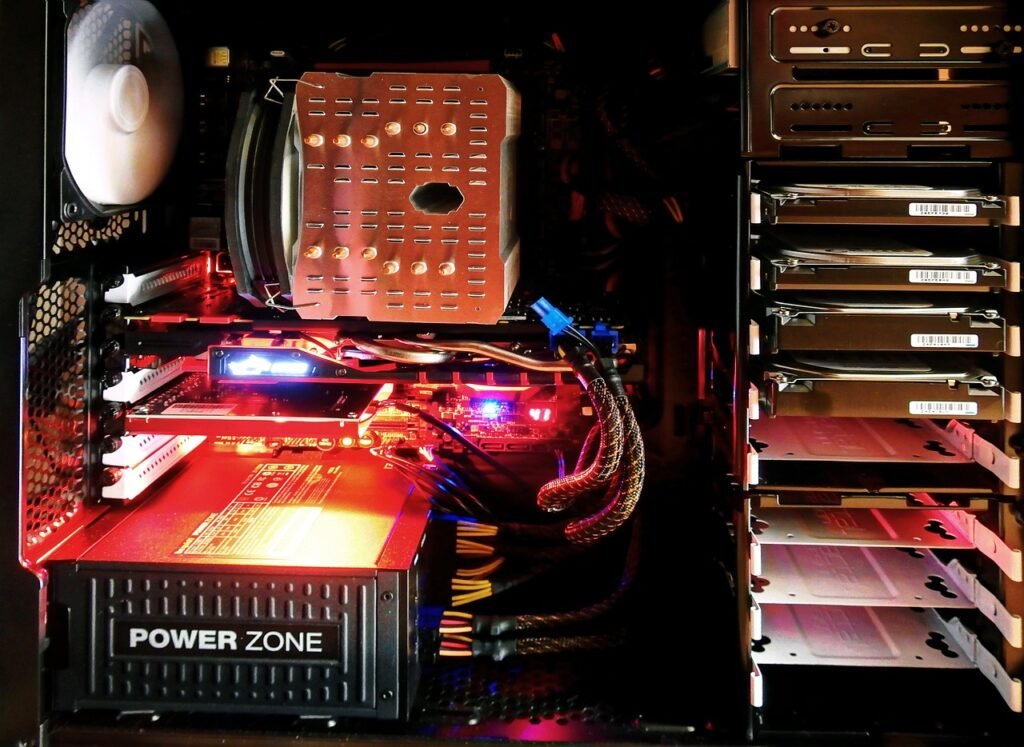
A personal cloud can be set up in several ways. Most commonly, it involves using a Network Attached Storage (NAS) device or converting an old computer into a private server. The device is connected to your home network, providing access to the stored data through web browsers, dedicated apps, or other network protocols. You essentially create your own mini-data center within your home or office. The critical distinction is that you own and control the hardware and the software running on it.
Benefits of Using a Personal Cloud
Enhanced Privacy and Security
- Data Ownership: You retain complete ownership and control over your data, mitigating concerns about privacy breaches or unauthorized access by third parties.
- Encryption Options: Most personal cloud solutions offer robust encryption options, both during data transfer (in transit) and while stored on the device (at rest).
- Reduced Reliance on Third Parties: You are not dependent on the terms of service or privacy policies of public cloud providers, providing greater peace of mind.
For example, you can set up two-factor authentication on your personal cloud to add an extra layer of security, preventing unauthorized access even if someone knows your password.
Cost Savings in the Long Run
- No Recurring Subscription Fees: Unlike public cloud storage plans that charge monthly or annual fees, a personal cloud involves a one-time investment in hardware and software.
- Scalability: You can easily expand storage capacity by adding more hard drives to your NAS device or upgrading components on your personal server, without incurring additional subscription costs.
Over the long term, the initial investment in a personal cloud solution often proves to be more cost-effective than paying for a public cloud subscription year after year, especially if you require a significant amount of storage.
Increased Control and Customization
- Tailored Configuration: You can customize your personal cloud environment to meet your specific needs and preferences, including setting up user accounts, managing access permissions, and configuring automated backups.
- Integration with Existing Devices: Personal clouds seamlessly integrate with your existing devices, such as computers, smartphones, tablets, and smart TVs, allowing you to access your data from anywhere.
- Advanced Features: Many personal cloud solutions offer advanced features such as media streaming, file versioning, and collaboration tools, which may not be available or may come at an extra cost with public cloud services.
You can install specific software packages on your personal cloud to turn it into a media server (Plex), a collaborative document editing platform (Nextcloud), or even a home automation hub.
Setting Up Your Personal Cloud
Choosing the Right Hardware
- NAS Device: A Network Attached Storage (NAS) device is a dedicated storage server designed specifically for home or small business use. Popular brands include Synology, QNAP, and Western Digital. NAS devices offer features like RAID support (for data redundancy), user management, and built-in apps.
- DIY Server: You can also repurpose an old computer as a personal server by installing a Linux distribution like Ubuntu or Debian, along with a personal cloud software package like Nextcloud or ownCloud. This option is more cost-effective if you already have a spare computer, but it requires more technical expertise.
When choosing hardware, consider factors such as storage capacity, processor power, RAM, network connectivity (Gigabit Ethernet is recommended), and energy efficiency.
Installing and Configuring Software
- NAS Software: NAS devices typically come with their own operating system and management interface, which makes setup relatively straightforward. You can usually configure user accounts, access permissions, and network settings through a web browser.
- Personal Cloud Software: For a DIY server, you’ll need to install and configure a personal cloud software package like Nextcloud or ownCloud. These platforms offer a user-friendly web interface for managing files, creating users, and installing apps.
The setup process generally involves installing the software, configuring storage settings, creating user accounts, and setting up security features such as encryption and two-factor authentication.
Security Considerations
- Strong Passwords: Use strong, unique passwords for all user accounts on your personal cloud.
- Firewall Protection: Ensure that your router’s firewall is enabled and properly configured to protect your network from unauthorized access.
- Regular Software Updates: Keep your operating system, personal cloud software, and router firmware up to date to patch security vulnerabilities.
- Two-Factor Authentication (2FA): Enable 2FA for an extra layer of security, requiring a code from your smartphone in addition to your password.
These security measures are crucial for protecting your data from unauthorized access and potential cyber threats.
Personal Cloud vs. Public Cloud
Key Differences
- Ownership: With a personal cloud, you own the hardware and control the software. With a public cloud, you are renting storage space and services from a third-party provider.
- Privacy: Personal clouds offer greater privacy and control over your data, while public cloud providers have access to your data and are subject to their own privacy policies.
- Cost: Personal clouds involve an initial investment in hardware, while public clouds charge recurring subscription fees.
- Maintenance: You are responsible for maintaining your personal cloud, including hardware upgrades, software updates, and security patches. Public cloud providers handle maintenance and security on their servers.
- Scalability: Public clouds offer virtually unlimited scalability, while personal clouds are limited by the capacity of your hardware.
When to Choose Each Option
- Personal Cloud: Choose a personal cloud if you prioritize privacy, control, and long-term cost savings, and if you are comfortable with managing your own hardware and software.
- Public Cloud: Choose a public cloud if you need unlimited scalability, convenience, and minimal maintenance, and if you are comfortable with trusting a third-party provider with your data.
For example, a photographer with sensitive client data may prefer a personal cloud for increased privacy, while a small business with rapidly growing storage needs may opt for a public cloud for its scalability.
Factors to Consider When Choosing a Personal Cloud Solution
Storage Capacity
Assess your current and future storage needs to determine the appropriate capacity for your personal cloud. Consider the amount of photos, videos, documents, and other files you plan to store. Choose a solution with enough storage space to accommodate your needs for the foreseeable future.
Performance
Consider the processor power, RAM, and network connectivity of your personal cloud solution. A faster processor and more RAM will improve performance, especially when streaming media or accessing large files. Gigabit Ethernet is essential for fast data transfer speeds.
Features
Evaluate the features offered by different personal cloud solutions, such as media streaming, file versioning, collaboration tools, mobile apps, and backup options. Choose a solution that meets your specific needs and requirements.
Security
Prioritize security features such as encryption, two-factor authentication, and regular software updates. Ensure that your personal cloud solution offers robust security measures to protect your data from unauthorized access and cyber threats.
Ease of Use
Choose a personal cloud solution that is easy to set up, configure, and use. Look for a user-friendly interface, clear documentation, and helpful support resources.
Conclusion
A personal cloud offers a compelling alternative to public cloud services, providing enhanced privacy, control, and cost savings in the long run. By carefully considering your needs and choosing the right hardware and software, you can create a secure and centralized storage solution for your digital life. While setup and maintenance require some technical knowledge, the benefits of owning and controlling your data make it a worthwhile investment. Embrace the power of a personal cloud and take control of your digital destiny today.






